
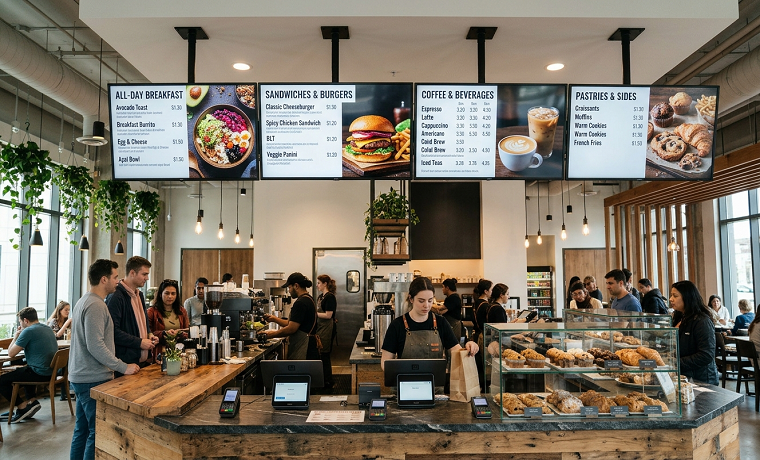
A digital menu board is ready for launch when customers can read it and staff can keep it accurate. Attractive photos help, but the essentials are more practical: the right menu information, a suitable screen location, and a clear process for changing content.
For a small cafe or takeout counter, preparation can start with one display. Work through the following checklist before opening day so the first service tests the menu, not everyone’s ability to find the remote.
Audit existing equipment before buying more
Start by recording the model of any TV the business already owns. Check its screen condition, available inputs, native resolution, and supported orientation. An existing display may suit an indoor trial, but its suitability depends on the location and intended operating hours.
Choose the signage software before buying a player. Some TVs can run a compatible app directly; others need a supported external device connected through HDMI. A Fire TV or Android player is an option only when the chosen software supports that particular device.
Test the proposed combination with actual menu files. A TV’s built-in USB player and an external streaming device use different playback systems, so performance on one does not establish performance on the other. Check images and video using the player the business intends to install.
Keep a simple equipment list with model names, power supplies, and account ownership. Store the remote where staff can find it. These details make the setup easier to maintain after the person who installed it has gone home.
Check the location from the customer’s position
Measure where customers will stand when choosing an order. A screen that looks large from behind the counter may be difficult to read from the back of the line. Use a sample menu on the proposed display rather than choosing screen size from a distance chart alone.
Look for obstructions, including hanging lights, shelving, and customers standing in front of one another. Test the view from more than one position. If the queue turns a corner, decide where customers should first be able to see the main categories and prices.
Check light conditions at breakfast, midday, and evening. Window reflections and overhead lights can hide otherwise readable text. Follow the display manufacturer’s placement guidance and test any proposed adjustment before committing to the location.
Finally, confirm power and network access. Use the player’s specified power supply, and support devices and cables according to their installation instructions. Arrange suitable help for mounting and any electrical work. The goal is a position staff can maintain without moving equipment whenever content changes.
Prepare one approved menu information file
Before opening a design tool, organize the menu in a spreadsheet or other shared source document. Include item names, prices, sizes, options, and the information customers need to choose between them. Use consistent wording across categories.
Have the person responsible for the register check the prices. A board showing one price while the checkout system shows another creates avoidable questions. Compare the proposed screen content with any printed menu and online ordering page that will remain in use.
Group items in a way that matches the ordering process. A sandwich counter might organize sandwiches, sides, drinks, and combinations separately. Short, recognizable category names help customers find the relevant section without reading every line.
Mark which items belong to each service period. Record when breakfast ends and which products remain available all day. This gives the person building the schedules a clear source to follow instead of relying on memory or an old promotional file.
Design for readable choices, not maximum content
Start with the essential menu, then decide what deserves emphasis. Item names and prices should be easy to locate. Use clear type, strong contrast, and enough spacing that neighboring lines do not merge when viewed from the queue.
Match the layout to the display’s orientation and aspect ratio. For example, 1920 by 1080 is a common landscape 16:9 canvas, but it is not the right starting point for every screen. Use export settings supported by the chosen player and software.
Avoid stretching a landscape design into a vertical layout. Build a separate template where needed. Keep price columns and category headings in consistent positions so staff can make later changes without rebuilding the entire board.
Test a realistic menu rather than a nearly empty sample. If the full list cannot be read comfortably, simplify descriptions, reorganize categories, or reconsider the number of displays. Shrinking all the text should not be the automatic solution to an overcrowded board.
Keep the main menu visible
Customers should not have to wait for the price list to return while standing at the register. Keep essential ordering information visible during service. Use a separate area or screen for promotional images if the layout allows it.
Motion can draw attention to a featured item, but it should not hide prices or interrupt reading. Test short clips on the installed player and check whether the movement distracts from the menu. A static promotion is a reasonable choice when it communicates more clearly.
Choose software around the update routine
A content-management system should make ordinary changes manageable for the people running the business. Test uploading a menu image, replacing it, arranging a playlist, and scheduling a change. Use real files and the account access staff will actually have.
One option is billiie affordable digital signage, which plays content from a compatible Amazon Fire TV or Android TV device and covers playlists, remote changes, timed scheduling, and uploaded images and video. A team member can be given access to a single screen, and each screen’s connection shows as online, idle, or offline.
Compare the required features and ongoing cost for the intended number of screens. Ask whether any separate tools are needed for ordering, structured menu editing, or other functions beyond displaying files. Remote publishing does not by itself establish that prices synchronize with an ordering system.
Choose one person to approve menu updates and train a backup. Keep editable templates and final exports in clearly labeled folders. Separate access for each staff member, where available, helps keep responsibilities clearer than passing one shared login around the team.
Build schedules around kitchen availability
Set service periods according to what the kitchen can prepare, not just when the business opens. A breakfast board should change when breakfast service ends. Confirm the transition with the person responsible for food preparation.
Check the software’s time zone and the days attached to each schedule. Weekends may follow different hours. Give holiday schedules a review date so a temporary change does not become the default for the following month.
For brief promotional slides, eight to twelve seconds can be a starting point to test, not a promise that every customer can read the content in that time. Watch a full loop from the queue and adjust it. Essential menu information should remain available while those promotions rotate.
Observe a scheduled transition before launch. Check that the next menu appears, old offers leave the rotation, and prices remain consistent with the register. A schedule is useful only when it follows the actual service routine.
Make QR codes useful rather than decorative
Choose one clear destination for each QR code. That might be an ordering page, a full menu, or a mobile-friendly information hub. A label such as ‘Scan for the full menu’ tells customers what to expect before reaching for a phone.
Test the code at its final size on the installed screen. Scan it from a realistic position with more than one phone. Leave clear space around the code, and check that reflections or nearby graphics do not make it difficult to use.
Review the destination as carefully as the board. Prices, item availability, and service times should agree. Assign responsibility for maintaining that page; a working code is not useful if it opens an outdated menu.
Rehearse connection problems and routine changes
Ask how the chosen software behaves without internet access. Offline playback varies by product and configuration. If it matters to the business, test it with the actual player rather than assuming that every uploaded file will remain available locally.
During a controlled test, disconnect only the test player’s network connection instead of unplugging the business router. Observe what stays visible and how the device recovers when reconnected. Keep a simple fallback menu available for staff if the display is unavailable.
Check startup behavior as well. Follow the equipment’s normal shutdown and restart procedures, then confirm the intended content returns. Record the expected input and the basic checks staff can perform if it does not.
Connection monitoring can help identify an offline player, but it cannot replace looking at the display. Add a visual check to opening duties so staff catch an incorrect input, an expired promotion, or a screen that is switched off.
Review the launch with staff and customers in mind
Before the first service, have the backup staff member make a sample change using the written process. Ask another employee to read the menu from the farthest ordering position. Correct confusing wording and cramped sections before customers need them.
After launch, collect specific observations. Are customers asking where drinks are listed? Is a price difficult to see? Does an offer remain on screen after the kitchen runs out? Those questions point to useful changes more directly than a general comment that the board looks modern.
Sales reports can provide context for featured items, but compare similar service periods and note other changes, such as pricing or product availability. Do not attribute every movement in sales to the screen. Readability and information accuracy are worth reviewing in their own right.
Sign off on a manageable first board
The final check is simple: approved menu information, readable content, a tested schedule, and named people responsible for updates. Include the software fee, equipment, mounting, and staff preparation time in the project budget rather than assuming avoided printing will cover every cost. Launch with a clear baseline instead of filling every available space. Keep essential choices visible, remove expired content promptly, and review the first week’s questions with counter staff. A well-prepared board gives the business a repeatable routine for the next menu change, not just an attractive opening-day display
About Author

Founder
David Watson is the founder of DesignDrizzle and is a professional website designer for over 10 years. He has competence in creating visually appealing and user-friendly websites for all the clients. He likes to explore new and creative ideas for designing, photography effects and other inspirational subjects